





Resolving an Alert
Resolving an alert means dealing with what caused it, then closing it with the reason, so your team has a record of what happened and what was done.
Step by step
- Take it.
Tap
 so your team knows someone is handling it.
 - Check the reading.
Tap the alert to open its details. How far past the limit is it, and is it still moving? The chart shows the trend and when it triggered.
- Find the sensor and the cause.
Go to the sensor (how to find it) and look for what set it off. See common causes below.
- Fix it.
Deal with the cause, then watch for the next reading to confirm it’s recovering. For a cold pipe, see responding to a low temperature alert.
- Keep the team posted.
A line in the chat (“Door was open, closed it, heater back on”) saves everyone a phone call.
- Close it.
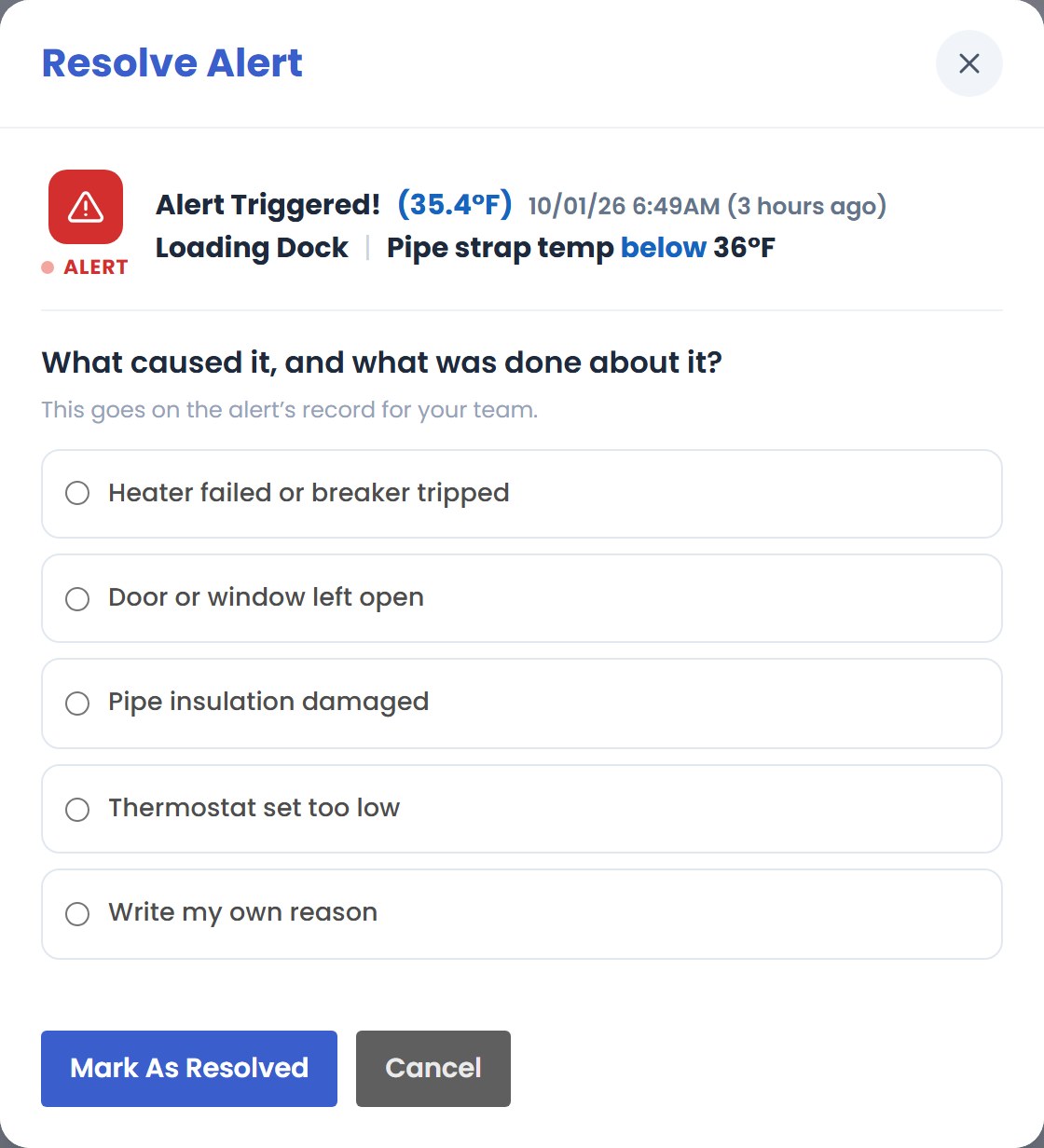
Tap
 (or
(or  ), choose
what caused it from your organization’s list or write your own, add details if they help, and confirm with
), choose
what caused it from your organization’s list or write your own, add details if they help, and confirm with
 (or
(or  ).
).
Common causes
Too cold
- An exterior or overhead door left open
- Heater off, out of fuel, or breaker tripped
- Thermostat turned down
- Missing or damaged pipe insulation
- Drafts through vents, louvers or broken windows
Too warm
- A heater or warm air vent close to the sensor
- Direct sun through a window
- Equipment that stopped cooling
- A door left open on a hot day
Humidity
- A leak or drip nearby
- Standing water
- A space with no fresh air
Nothing wrong?
- The strap came loose from the pipe
- The sensor was moved or knocked down
- Someone was working on the pipe
Resolved or False Alarm?
Something really changed, like a pipe getting cold because a door was left open, and you dealt with it.
The reading wasn’t real: the strap slipped off the pipe, or the sensor was moved. Close it as a false alarm with the reason, then fix the sensor so it doesn’t happen again.
What happens next
- The alert closes for everyone. Your name and the reason go on its record, and the chat keeps the whole story.
- You can look it up later in
 .
. - Closed while the reading is still out of range? It stays on the list for 24 hours, marked “Resolved but still out of range”, then moves to Alert History.
- If the reading comes back in range and goes out again later, that’s a new alert.
Back in range on its own? It still needs closing with a reason. A heater that cycles off at night or a door that doesn’t latch will do it again, and the record helps you spot that.
Need a hand?
- Bring in outside help. An administrator can share the alert with a contractor using a simple link: no app or login needed. How sharing works
- Tap Help on the alert for quick cards about that alert.
- Call our support team, 7 days a week, at the number below.